In July 2026, GitHub Agentic Workflows added Docker Sandboxes as a supported agent runtime. It means that in your CI an AI coding agent can have broad control of its environment, including being able to run Docker containers, while the environment itself is isolated in a microVM with a network policy and secrets injection like the current best practices for AI isolation advice.
Agentic isolation matters because useful coding agents do more than read a repository and suggest a patch. They install tools, run arbitrary shell commands, execute project code, start databases, and occasionally discover surprising new meanings for the word “cleanup.” Those capabilities make the agent useful, and direct access to a CI runner gives every mistake a larger blast radius.
Now, with sbx integrated, the boundary for the Agent is a disposable environment with substantial freedom inside and narrow access to everything outside it.
I put together a small example to see what that looks like in practice. The agent runs on a GitHub-hosted Ubuntu runner, enters a Docker Sandbox (sbx), runs a Java integration test suite with PostgreSQL using Testcontainers, finds an intentionally seeded bug, fixes it, and opens a draft pull request. The Github Agentic Workflows offers the integration out-of-the-box, so the setup requires zero custom configuration for actions.
What are GitHub Agentic Workflows?
GitHub Actions remains the CI system. It schedules the job, provides the Ubuntu runner, manages permissions and secrets, and records the result.
GitHub Agentic Workflows, usually shortened to gh-aw, is an open-source GitHub CLI extension and compiler. You describe an agentic workflow in a Markdown file that combines execution configuration in YAML frontmatter with the agent’s task in the body. Running gh aw compile turns that source into a conventional GitHub Actions workflow with a .lock.yml suffix.
The relationship looks like this:
Markdown workflow
    |
    | gh aw compile
    v
Generated GitHub Actions .lock.yml
    |
    | runs on ubuntu-24.04
    v
Docker Sandbox microVM
    |
    v
Copilot agent and its tools
docker-sbx belongs to gh-aw‘s agent runtime configuration. The runs-on field still selects ubuntu-24.04, and the compiled file is a standard GitHub Actions workflow. It installs the sandbox tooling, authenticates it, checks the runner, starts the agent in the sandbox, and cleans everything up afterward.
That integration landed in gh-aw and shipped in version 0.82.9.
Configuring sbx in GitHub Actions
Here is the configuration from the sample’s sandbox-explorer.md:
---
name: "Docker Sandboxes sample: exploratory test"

on:
  workflow_dispatch:

runs-on: ubuntu-24.04

permissions:
  contents: read
  copilot-requests: write

engine: copilot

network:
  allowed:
    - defaults
    - github
    - containers
    - java

sandbox:
  agent:
    id: awf
    runtime: docker-sbx
    sudo: true

tools:
  edit:
  bash: [":*"]

safe-outputs:
  create-pull-request:
    title-prefix: "[docker-sbx sample] "
    draft: true
    protected-files: blocked
    allowed-files:
      - "src/**"
---
The three lines under sandbox.agent select the Docker Sandbox runtime. Inside it, the agent has the sudo and unrestricted shell access needed to build the application and start its test infrastructure.
Outside the sandbox, the workflow keeps a much smaller surface. Its network block allowlists the destinations this job needs, while the agent’s GitHub token can read repository contents and send requests to Copilot. Pull request creation happens in a separate safe-output job whose patch may contain files only under src/**.
How much autonomy a CI agent should receive depends on the job. For this one, the split is useful: broad shell access inside the sandbox, small network and repository surfaces outside it, and a draft PR that still expects human review.
The isolation boundary is a micro VM
While it’s common to assume that “Docker” implies a single application container, this setup actually uses a microVM as the primary isolation boundary.
With sbx, every sandbox is a dedicated environment with its own kernel, filesystem, and network stack. Most importantly, it runs its own private Docker daemon. This means the agent gets full root privileges inside the VM without ever gaining control over the host’s Docker daemon. The only bridge between them is the explicit shared workspace of the repository.
Having a private daemon is a game-changer for integration testing. In this demo, the app runs Testcontainers exactly as a developer would on their local machine. The resulting structure looks like this:
GitHub Actions runner
└── Docker Sandbox microVM
    ├── GitHub Agentic Workflows agent
    └── Private Docker daemon
        ├── Maven / Java 21 container
        └── PostgreSQL Testcontainers container
To keep the environment clean, the test launcher runs Maven inside a pinned container, passing the sandbox’s Docker socket through so it can talk to the private daemon:
docker run --rm \
  --add-host=host.testcontainers.internal:host-gateway \
  -e TESTCONTAINERS_HOST_OVERRIDE=host.testcontainers.internal \
  -v "$PWD:/workspace" \
  -w /workspace \
  -v /var/run/docker.sock:/var/run/docker.sock \
  maven:3.9.9-eclipse-temurin-21@sha256:3a4ab3276a087bf276f79cae96b1af04f53731bec53fb2e651aca79e4b10211e \
  mvn --batch-mode "$@" test
Testcontainers then uses that socket to spin up the PostgreSQL database. It sounds like a lot of layers—a container running a build that starts another container, all inside a microVM on a CI runner but each layer serves a specific purpose in ensuring the agent remains isolated yet fully capable.
Giving the agent a defect worth finding
The sample is a small Java 21 registration service. Its requirements say that email addresses are case-insensitive. The seeded implementation stores them as provided and relies on PostgreSQL’s case-sensitive unique constraint. An existing Testcontainers integration test catches exact duplicates but says nothing about the latter case.
The Markdown portion of the workflow asks the agent to inspect the requirement and code, run the baseline suite, and add a test for two addresses that differ only in case. If the invariant fails, the agent should make the smallest source correction. Before touching the application, it records uname, Docker version, Docker information, and a tiny Alpine container run, leaving specific evidence in the workflow log about where the work executed.
The task itself is plain Markdown beneath the frontmatter in the yaml file. The important part for us (after some commands for recording the environment for debugging) is:
Act as a bounded exploratory tester for this repository.
...

Then:
1. Read `REQUIREMENTS.md` and the relevant source and test files.
2. Run `./scripts/test-in-docker.sh` without changing anything.
3. Add a PostgreSQL Testcontainers test that checks registration of two
   addresses that differ only in letter case.
4. Run the focused test and explain the observed behavior.
5. If the implementation violates the documented invariant, make the
   smallest fix under `src/`.
6. Run the complete test suite again.
7. Create one draft pull request containing the regression test and fix.
And the prompt level guardrails to suggest the correct behavior:
Do not modify dependency manifests, workflow files, scripts, documentation,
or generated files. Do not weaken or delete existing tests. Include the
commands run and their results in the pull request description.
The real run of course followed that path: its baseline passed, then the new case-variation test failed with:
expected: <false> but was: <true>
The agent normalized the email before inserting it, reran the complete suite, and got two passing integration tests.
The log reported Docker client and server version 29.7.1 with the default context. It is the correct Docker version currently in the sbx default sandbox template. This is the sandbox’s private daemon, the one Testcontainers library used to launch PostgreSQL for the integration tests.
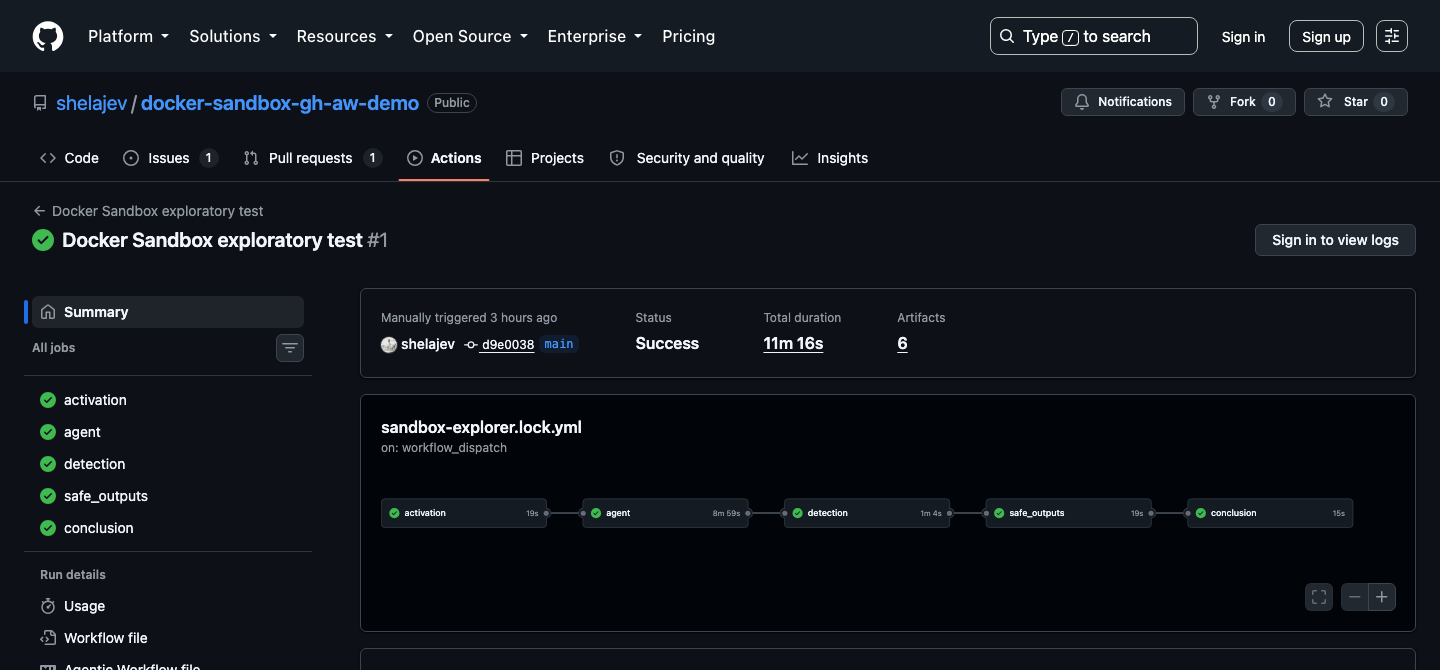
The complete workflow passed on GitHub’s hosted ubuntu-24.04 runner. The run took 11 minutes and 16 seconds.
The safe-output job then opened a draft PR containing exactly two files under src/**: the regression test and the one-line normalization fix. Workflow configuration, scripts, dependencies, and documentation were outside its allowed patch surface.
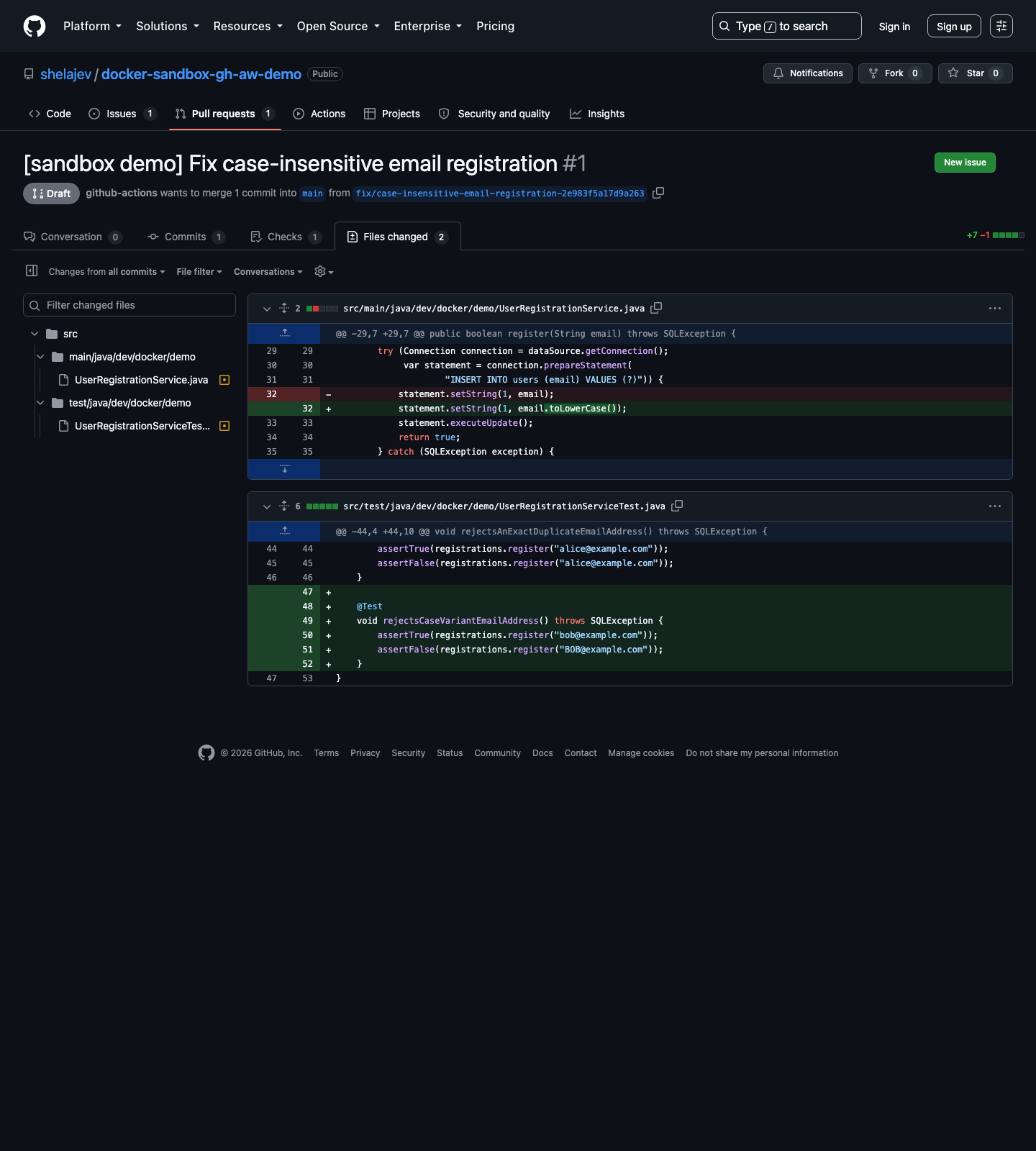
The generated draft pull request stayed inside the declared source-only boundary.
Running the workflow yourself
Start by installing the gh-aw:
gh extension install github/gh-aw
The compiled Docker Sandbox runtime needs Docker credentials to authenticate and pull its sandbox template. Add DOCKER_USERNAME and DOCKER_PAT under the sample repository’s Settings > Secrets and variables > Actions, or let the GitHub CLI prompt for both values:
gh secret set DOCKER_USERNAME
gh secret set DOCKER_PAT
The repository’s Copilot entitlement and copilot-requests: write were sufficient for the successful sample. Repositories without that entitlement can use a supported COPILOT_GITHUB_TOKEN secret as documented by gh-aw.
Also enable Allow GitHub Actions to create and approve pull requests in the repository’s Actions settings. Then compile the Markdown source and commit both the source and generated workflow:
gh aw compile sandbox-explorer

git add .github/workflows/sandbox-explorer.md \
  .github/workflows/sandbox-explorer.lock.yml
git commit -m "Compile Docker Sandboxes sample workflow"
git push
The .lock.yml is generated code. Changes belong in the Markdown source, followed by another compile.
Finally, start the workflow and watch it:
gh aw run sandbox-explorer
gh run watch
The sample works on GitHub’s hosted ubuntu-24.04 runner as committed. A self-hosted Linux runner needs an appropriate KVM-capable setup, plus the Docker and system access required by Docker Sandboxes.
Try sbx on your laptop
Support for isolating your agents in CI is fantastic, but the easiest way to understand Docker Sandboxes is to put one around an agent on a local project. Follow the Docker Sandboxes setup for your platform, sign in, move to a repository, and run an installed agent:
sbx login
cd ~/my-project

sbx run <claude|codex|opencode>
Give it a task that needs real tools, such as running tests, building an image, or starting a Testcontainers dependency. sbx is much easier to evaluate and understand when the workload is your actual development loop.
And if your experiment grows into an organization-wide agent rollout, Docker AI Governance is the next thing to explore. It applies organization and team policies for sandbox network, filesystem, and MCP access, and records policy decisions in audit logs. Those records help to identify the source client, including sbx, and the machine hostname, so the same policy and audit model can easily cover your team’s laptops and your CI runners.